
How to Create AI Video A Practical Guide
Creating an AI video really boils down to four key moves: coming up with an idea, writing a solid prompt, generating the visuals with an AI tool, and finally, adding sound. That whole process takes a simple text concept and turns it into a finished video, all without ever touching traditional filming equipment.
A New Era of Visual Storytelling
Welcome to a fundamental shift in how visual content gets made. The ability to create AI video isn't some far-off concept anymore; it's a real, practical skill for everyone from marketers to indie creators.
You can forget about the headaches of film crews, pricey cameras, and endless editing sessions. Today, the building blocks of video production are powered by artificial intelligence and managed with simple text commands. This new workflow is just incredibly efficient, letting you pump out high-quality visual content at a speed and scale that was pure fantasy just a few years ago. This isn't just a trend—it's a whole new industry blowing up right before our eyes.
The Core Process Explained
At its heart, learning how to create AI video is all about mastering a new creative loop. It kicks off in your imagination and wraps up as a digital asset ready to be shared. The whole thing is surprisingly straightforward and can be broken down into a few distinct stages.
This visual flow maps out the journey, from a simple text idea all the way to a complete video with both picture and sound.
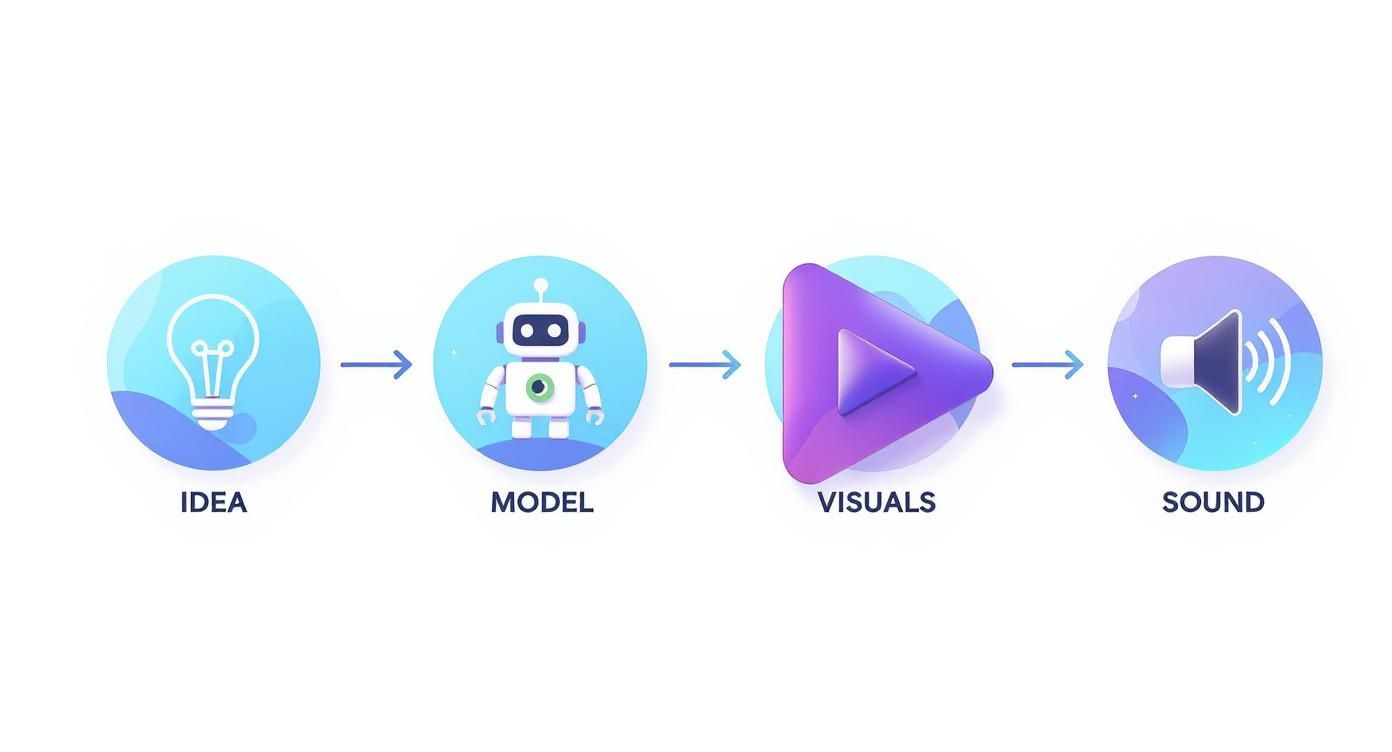
As you can see from the infographic, each step builds right on top of the last one. It really hammers home the point that the quality of your initial idea and prompt has a direct impact on how good the final video turns out.
Core Components of AI Video Creation
To get a clearer picture, let's break down the essential pieces involved in making a video with these tools. From your initial brainstorming to the final render, each component plays a critical role.
| Component | Description | Example Tool/Concept |
|---|---|---|
| Concept & Idea | The foundational story or message you want to convey. | A marketing idea for a new coffee blend. |
| Scripting/Prompting | Writing the detailed text commands that guide the AI. | Using a detailed prompt from PromptDen. |
| Visual Generation | The AI model creates video clips or images based on your prompts. | Runway, Pika, or Sora |
| Audio Integration | Adding voiceovers, music, or sound effects to the visuals. | AI voice generators like ElevenLabs. |
| Editing & Polish | Assembling the generated clips and audio into a cohesive final video. | Traditional editors or AI-powered tools. |
Grasping how these elements fit together is the key to moving from a simple text prompt to a compelling final video.
Why This Matters Now
The hunger for engaging video content has never been greater, and AI tools are stepping up to meet that demand. This explosion in adoption is fueling some serious market growth.
The global AI video generator market was valued at USD 534.4 million and is expected to rocket to roughly USD 2.56 billion by 2032. That reflects a compound annual growth rate of nearly 19.5%, signaling a massive change in content strategy across every industry imaginable. You can dig into more details on this market expansion from Fortune Business Insights.
For creators and businesses, this isn't just about cool new tech. It's about getting a real competitive edge by producing more content, testing ideas faster, and telling visual stories in ways that were once way too expensive or time-consuming.
This guide will walk you through every part of this process, giving you the practical steps and insider tips you need to start creating your own compelling AI-powered videos today.
Mastering the Art of the Video Prompt
The difference between a bland, wobbly AI video and a breathtaking cinematic scene often comes down to one thing: the prompt. Your text input is the director's chair, the camera lens, and the lighting rig all rolled into one. If you want to create AI video that truly captures attention, you have to learn how to write prompts with intention and detail.
A lazy prompt like "a dog on a beach" might technically give you a video, but it will have no soul. It leaves far too much up to the AI's imagination, and the result is usually a generic, uninspired clip. The real magic happens when you get incredibly specific, layering in details that steer the AI toward your precise vision.
Deconstructing a Powerful Prompt
A great video prompt is so much more than a simple command; think of it as a descriptive recipe. When you break your idea down into its core components, you gain an immense amount of control over what comes out the other side. It’s like building a scene piece by piece.
Start with your basic idea and then begin layering on the creative flair. Each new element you add refines the AI's understanding and narrows the creative possibilities, pushing it closer and closer to what’s in your head.
Here are the key ingredients for a high-impact prompt:
- Subject and Action: Get specific about who or what is in the scene and what they are doing. "A golden retriever" is better than "a dog." "A golden retriever chasing a red frisbee at full speed" is even better.
- Setting and Environment: Paint a picture of the location. Are we on a "sun-drenched tropical beach with turquoise water" or a "misty, rocky coastline at dawn"? The details matter.
- Artistic Style: This is where you inject personality. Are you going for a "grainy 35mm film look," a "vibrant anime style," or maybe a "hyperrealistic 8K render"?
- Lighting and Mood: Use words to set the atmosphere. "Dramatic cinematic lighting," "soft golden hour glow," and "eerie neon-lit alleyway" all create vastly different feelings.
- Camera Work: You're the director, so direct the camera! Specify the shot type and movement, like a "dynamic drone shot flying low over the waves" or a "slow-motion close-up shot."
Before and After Prompt Examples
Let's put this into practice. A small tweak in detail can lead to a monumental jump in quality.
Weak Prompt:
A car driving in the city.
Strong Prompt:
A vintage muscle car, gleaming cherry red, speeds through a rain-slicked city street at night. Neon signs reflect off the wet asphalt, dramatic low-angle shot, cinematic, 35mm film grain.
See the difference? The second example gives the AI a complete blueprint. It defines the car's type and color, the environment's condition, the specific lighting, the camera angle, and the overall aesthetic. This is the level of detail that unlocks truly impressive results. For a deeper dive, our guide on how to write prompts for better AI results covers more valuable techniques.
The most effective prompts are built through iteration. Start with a core idea, generate a clip, and then refine your prompt by adding or changing details based on the output. Treat it as a conversation with the AI.
Finding the Right AI Video Generator for Your Project
With a new AI video tool popping up what feels like every week, picking the right one can feel impossible. The trick is to cut through the noise and zero in on what your project actually needs. They're not all built the same—some are great for whipping up quick, snappy social media clips, while others are geared towards more cinematic, story-driven content.
A good starting point is deciding between text-to-video and image-to-video platforms. Text-to-video tools are incredible for pure brainstorming, letting you bring entire scenes to life from nothing but a detailed description. In contrast, image-to-video gives you more upfront control over the scene's composition by animating a static picture you provide.
What to Look For in a Generator
Before you pull out your credit card, it's smart to measure any platform against a few key benchmarks. These are the things that will really determine if a tool works for your creative style and, just as importantly, your budget.
- Output Quality and Style: Does the generator kick out high-resolution video, or is it full of weird artifacts like flickering and warping? Even more crucial, can it match the specific vibe you're going for—photorealistic, animated, a grainy film look?
- Ease of Use: A tool with a million features is worthless if the interface is a nightmare to navigate. Look for something intuitive that lets you generate, tweak, and perfect your clips without needing a user manual the size of a phone book.
- Control and Customization: How much of a director can you be? Some tools let you get granular with camera movements, aspect ratios, and how much motion is in the scene, giving you way more creative power.
- Pricing and Credit System: Most of these tools run on a credit-based subscription. Do the math on what each video generation will cost you. Make sure it makes sense for your budget, especially if you plan on making a lot of content.
This explosion in video tools is part of a much bigger shift. The global artificial intelligence video market was already valued at USD 10.29 billion and is projected to rocket to an incredible USD 156.57 billion by 2034. That's a growth rate of 35.33% every year. If you want to dive deeper into the numbers, check out the full analysis on the AI video market from Precedence Research.
Match the Tool to the Task
The best choice really boils down to your specific goal. There isn't a single "best" AI video generator out there, just the one that’s best for the job you need to get done.
A marketing team, for instance, might need a fast, eye-catching ad for an Instagram story. They'd probably go for a tool known for speed and vibrant, dynamic visuals. An independent filmmaker experimenting with a short film concept, on the other hand, would want a generator that offers top-tier cinematic quality and character consistency, even if it's a bit slower. As you weigh your options, it can be helpful to look at a broader list of the best AI tools for content creators to see what else is out there.
To help you get a clearer picture, I've put together a quick comparison of some of the top players in the game. This table breaks down what each tool is really good at, its standout features, and how they handle pricing.
AI Video Generator Feature Comparison
| Tool Name | Best For | Key Feature | Pricing Model |
|---|---|---|---|
| Runway | Cinematic quality and creative control | Gen-2 model, advanced camera controls | Subscription (Credits) |
| Pika | Dynamic character animation & lip-sync | Lip-sync, image expansion | Freemium & Subscription |
| Luma AI | 3D scenes and smooth camera movements | "Dream Machine" for high-quality video | Free (currently) |
| HeyGen | AI avatars and professional presentations | Realistic avatars, voice cloning | Subscription (Credits) |
| InVideo AI | Quick social media and marketing videos | Full workflow with script & voiceover | Subscription |
This is just a snapshot, of course. The best way to know for sure is to get your hands dirty.
Pro Tip: Always, always take advantage of free trials. Seriously. Generate a few test clips on different platforms using the exact same prompt. It's the quickest way to see which tool’s output quality and "style" naturally clicks with your vision.
Ultimately, knowing the strengths and weaknesses of different generators is key. For a really detailed breakdown of the leading platforms, check out our guide on the top AI video generators to use in 2025. Making an informed choice upfront will save you a ton of time, money, and creative frustration later on.
Generating and Refining Your Video Clips
With your prompt locked in and your tool of choice fired up, we get to the fun part: the first generation. This is where your carefully crafted words start to blossom into actual moving images. You’ll drop your prompt into the generator, tweak a few key settings, and hit that magic "generate" button.
Most platforms will ask you to set some basic parameters before you kick things off. Don't just fly past these—they’re critical for getting an output that actually matches what's in your head.
- Aspect Ratio: Is this for a TikTok or Reel (9:16), or are you aiming for a cinematic YouTube video (16:9)? Getting this right from the start saves you a world of headache and awkward cropping later on.
- Motion Intensity: Many tools give you a slider to control the amount of camera movement. A lower setting is perfect for subtle, atmospheric shots. Crank it up for more dynamic, action-packed sequences.
- Seed Number: If the tool offers it, using a specific seed number is a pro-level move. It helps the AI produce more consistent results if you need to regenerate the same prompt multiple times.
Once you’ve generated your first set of clips, the real work begins. You're now in the iterative loop of analysis and refinement—this is what separates amateur attempts from polished, compelling content.
Analyzing and Improving Your Clips
Let's be real: your first outputs will almost never be perfect. The key is to look at them with a critical eye, almost like a detective, hunting for those common AI quirks so you can squash them with targeted prompt adjustments. It’s all about diagnosing the problem, then rewriting your prompt to be the solution.
You’ll see things like flickering visuals, characters whose faces change from one frame to the next, or just plain bizarre, unnatural movements. Don't get frustrated. This is completely normal. For instance, if you notice a character's jacket color keeps changing mid-scene, you can go back and add a stronger, more specific phrase to your prompt, like "wearing a consistent bright red raincoat in every shot," to hammer that detail home.
The goal isn't to get a perfect clip on the first try. It's to get a usable starting point that you can systematically improve through smart, iterative prompting. Each generation is a lesson that informs the next.
Creating Consistent Characters and Scenes
One of the biggest hurdles in AI video today is keeping things consistent across multiple clips. This is especially true for characters and locations. If your video is telling a story, your main character can’t look like a different person every time they appear on screen.
To fight this, your prompts need to be relentlessly consistent. I like to use a "character sheet" approach in my notes. I'll define specific physical traits—hair color, eye color, clothing style, a distinguishing feature—and then I copy and paste that exact description into every single prompt featuring that character. When you combine this technique with a consistent seed number, you can dramatically improve the scene-to-scene coherence.
This refinement stage is where you truly shape the final video. For a deeper dive into fine-tuning your clips after generation, there are some great AI video editing guides that offer more advanced techniques. This back-and-forth process is what ultimately turns a jumble of raw AI outputs into a believable and engaging story.
Bringing Your Final Video to Life
Think of the raw clips from an AI generator as your foundational ingredients. They're the building blocks, but they aren't the finished meal. The real magic happens in the editing room, where you weave these individual shots into a story, layering in the sound and polish that truly bring your vision to life.
This post-production step is what turns a pile of AI outputs into a professional-looking video.
The good news? You don’t need a Hollywood-tier editing suite to pull this off. Simple, and often free, software like CapCut or DaVinci Resolve gives you everything you need. You can arrange your clips, trim them to perfection, and build a visual flow that hooks your viewer from the very first second.
Adding an Audio Layer
Sound is easily half the experience of any video. Finding the right audio is critical for setting the mood and getting your message across. The right soundtrack can make a simple scene feel epic, while the wrong one can completely torpedo your video.
I always start by exploring these key audio elements:
- Royalty-Free Music: Websites like Epidemic Sound or Artlist have massive libraries of high-quality music. It's worth spending a little time finding a track that genuinely matches the energy of your video.
- AI Voiceovers: For tutorials or narrative shorts, tools like ElevenLabs can generate shockingly human-like voiceovers from a simple script.
- Sound Effects (SFX): Never underestimate the power of subtle background noises or action sounds. They add a layer of realism and depth that makes your video feel so much more immersive.
Once you’ve gathered your audio files, you’ll import them into your editing software and start syncing them with the visuals. This is a bit of an art form—aligning the emotional peaks of the music with key visual cuts and making sure the voiceover lands at just the right moment.
A great video is a sensory experience. The right audio doesn't just support the visuals; it elevates them, creating a combined impact that's far more powerful than either element on its own.
Applying the Final Polish
With your story sequenced and the audio in place, it's time for the final touches that give your video that professional sheen. These small details make a huge difference in how the final product is perceived.
Simple text overlays can provide context or highlight key points. A bit of basic color correction can make your visuals pop and ensure a consistent look across all your AI-generated clips. It’s these final steps that tie everything together.
This entire process—from generation to final edit—is quickly becoming a core part of modern marketing. New research predicts that by 2029, an estimated 70% of marketing teams will use AI-generated videos in their campaigns. And it's not just about efficiency; 63% of businesses already report significant cost savings, averaging a 58% reduction in production expenses. You can dive deeper into the business impact of AI video on Zebracat.ai.
The skills you're picking up here aren't just for a creative hobby; they are becoming genuinely valuable assets in a digital-first world. For a broader look at where content is headed, check out our guide on 10 content creation best practices for 2025.
Got Questions About Making AI Videos?
Jumping into AI video creation is exciting, but let's be real—it brings up a lot of questions. It’s a brand new field that's changing practically every week, so it's totally normal to wonder about everything from the price tag to the legal stuff. We've been there.
We put together some of the most common questions we hear to give you clear, straightforward answers. Think of this as your quick guide for handling the practical side of things so you can get back to creating.
How Much Does It Cost to Create an AI Video?
The cost can be anything from completely free to hundreds of dollars a month. It all comes down to the tools you end up using. Most platforms will give you a free trial or a handful of credits to start, which is the perfect way to get your feet wet without pulling out your wallet. I always recommend trying a few different generators this way to see which one clicks for you.
If you decide to upgrade, paid plans for hobbyists usually hover around 10-20 per month. This gets you more video generations and fewer limits. For the pros or teams needing more power, plans can climb past $100 per month, but that usually includes a ton of credits, access to advanced features, and better support.
Here's some perspective: even at the professional tier, creating AI video is a tiny fraction of what traditional video production costs. A simple shoot can run into the thousands. This massive cost difference is exactly why so many creators are jumping on board.
What Are the Legal Rights to AI Generated Videos?
This is the big one, and honestly, the legal world is still playing catch-up with the tech. The short, slightly frustrating answer is: it's complicated.
Right now, copyright law for content made entirely by an AI is a bit of a gray area. In places like the United States, the current thinking is that work without significant human input might not qualify for copyright protection. But here's the key: the final video you produce—after you've meticulously selected clips, arranged them, edited them, and added your own sound—is a whole different ballgame. That's your creative work.
A few things to keep in mind:
- Your Edited Work: All your creative decisions—the editing, the timing, the story you tell—add up to human authorship, which is far more likely to be protectable.
- Platform Terms of Service: This is crucial. Always, always read the terms of the tool you're using. They will spell out exactly what you can and can't do with the videos you generate (like using them for commercial projects versus personal ones).
How to Maintain Visual Consistency Across Clips
Getting a character or a scene to look the same from one clip to the next is probably one of the biggest headaches in AI video right now. One wonky clip can completely pull your viewer out of the story.
The good news is, there are some tricks you can use to wrangle the AI and get more consistent results.
- Use a "Seed" Number: Many platforms have this feature. A seed is just a starting number for the AI's random generation process. If you use the same prompt with the same seed number, you'll often get results that are very visually similar. It's a game-changer.
- Be Relentlessly Detailed: I can't stress this enough. Write up a "character sheet" in a separate document. Get super specific (e.g., "woman with fiery red hair in a high ponytail, wearing a black leather jacket, silver hoop earrings"). Then, copy and paste that exact description into every single prompt for that character.
- Leverage Built-in Features: Some of the newer tools are rolling out "character lock" or "style lock" features to tackle this exact problem. If your tool has one, use it. It's designed to make your life easier.
- Generate from an Image: Instead of starting with just a text prompt, try starting with a base image. Giving the AI a consistent visual reference point can anchor its generations and keep things looking much more cohesive.
Ready to find the perfect prompts to fuel your video creations? PromptDen is a community-driven marketplace where you can discover, share, and even sell high-quality prompts for video, image, and text AI models. Stop guessing and start creating with proven prompts from top creators. Explore the marketplace and find your inspiration at https://promptden.com.